Long time user but new to start dates and working with GoodTask more as a project management tool. I use it across MacOS27 and iOS27 and I can't figure out where my start dates are going wrong.
Basically, I have a number of tasks that I want to appear as ongoing until the due dates. I can set the start and due dates fine on iOS (I can't set a start date on Mac, but they then show up from the iOS entries). They initially behave as expected, but somewhere along the line they keep defaulting the start dates back to the due dates. I just can't figure out if it's from the Mac side or the iOS side so I don't know if I'm doing wrong or if there is some kind of bug/glitch. Sorry I can't be more specific - I just can't seem to predict when the tasks will disappear as currently ongoing, until I notice that the tasks are no longer showing up in the expected lists, and I may not notice that for a day or two. I've re-entered the start dates several times, and have checked the sync across devices and they seem fine. However, despite doing this a few days ago, today they have reverted.
You may want to check if you have 'Type: Date' to 'Advanced' on macOS. It should bring start date button on the left side of due date button on item detail page.
I'm not aware of the reverting issue yet. If you get to know how to reproduce it, please let me know. If you're not using iCloud as the data source, it could be due to that. I'll check it on my side too. Thanks!
Thanks for the reply! Yes, I have the advanced dates checked in MacOS - I don't see the start date in the pop-up to create a new task but I do see it in the task detail once I've made the task, so thanks for clarifying that. It's different in iOS - a new task will let me put in the start date without having to do that extra step that has to be done in MacOS.
In relation to the reverting issue, it has happened again overnight! I checked the tasks yesterday evening and they still had their start date, but now they've gone, so maybe it's something that happens overnight?
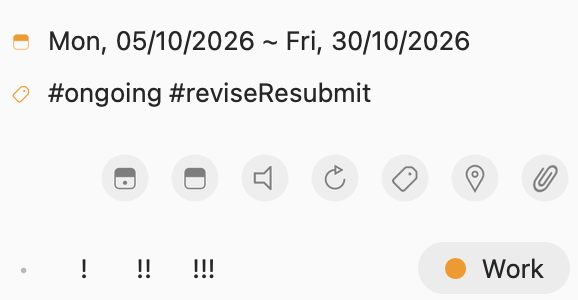
Yesterday I set a start date again for an article I need to work on for this month. Here is the screenshot from yesterday:
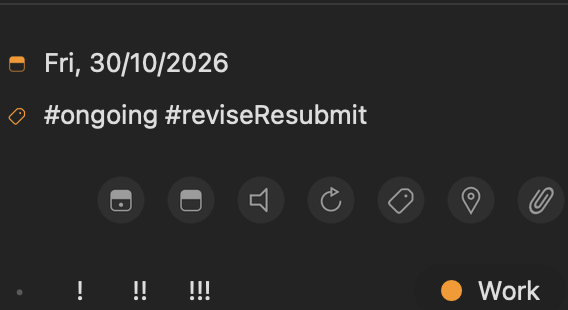
Here is the one I've just taken that shows it reverts to the due date ... oops I'll have to send it in another reply as when posting it says I can only attach one screenshot. I'll reply again with the second screenshot.
The screenshots are on MacOS but the behaviour is the same in iOS. I am using iCloud syncing and everything else about GoodTask works brilliantly for me, so this is a bit of a head scratcher!
Thanks for the details. I've looked into this but couldn't find any cause at the moment. Do you have any other apps or services that could adjust Reminders database? You can check in default Settings app > Privacy & Security > Reminders.
Or you may want to check if you have 'Automation' running inside GoodTask or maybe Shortcuts app?
Thanks again! I have found another app in the privacy and security that can access reminders but only on iOS. The app is called 'Structured' and gives me a visual way to look at my calendar and reminders. It's only to read in the reminders, but for now I've disabled that and have redone the start date for the task. I'll see if it changes again overnight now that Structured no longer has access. I don't have any automations or shortcuts related to GoodTask, so maybe this is the cause. I will check back tomorrow!
I’m not sure if that app edits date or not. Anyway, if it happens again, send me some more details about the task and your status to contact@hahaint.com through screenshots or screen recordings. Thanks!