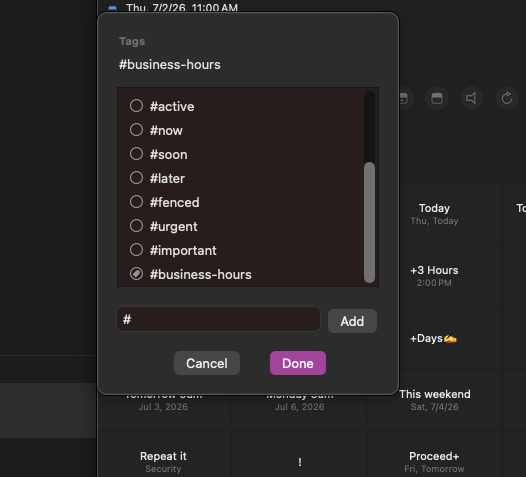
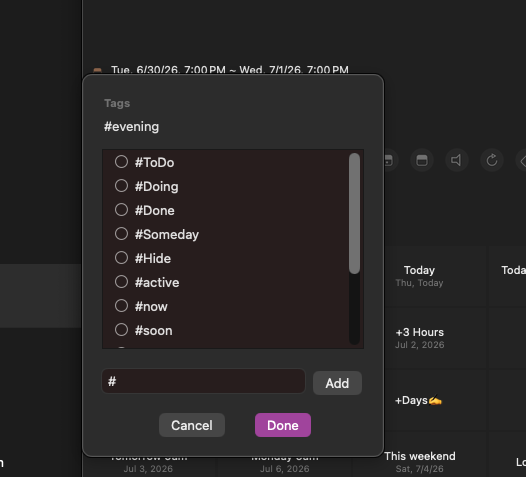
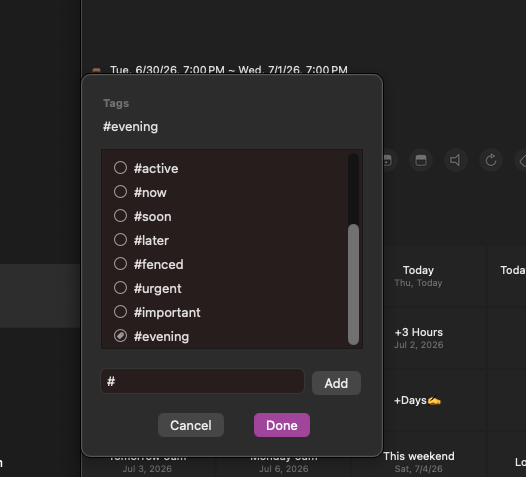
When I create a tag dynamically/inline for #business-hours, for example, it adds the tag to the item being edited... but the tag isn't added to the master tag list. As soon as I try adding a tag to another task, the #business-hours tag isn't there.
Here are screenshots of the tag showing on my master list when added dynamically, but being missing when going back to that list later, with another task:
Thanks for the report. I'll take a look.
Hi @thatadamguy , I'm trying to reproduce the issue but having hard time doing it. Would you share a screen recording of the issue to contact@hahaint.com ? It would be helpful. Thanks!
I'll email the scren recording, too
Wanted to make sure you got this. What do you think?
This should be resolved in latest version. Thanks!
Excellent! Can't wait to check it out!
No, this is still not working. When you add a new tag, it will stick. But as soon as you uncheck that tag, it's gone. It won't be there for the next task to choose from, or even that same task again. Watch this video
Thanks for the video. Saw it several times, it seems pretty weird since it's working well on my side.
Normally when you remove the tag, it should be removed. That's proper behavior. But if you add one, it should be shown on other tasks.
One question, you already have #business-hour tag on the task above the newly made one. Why isn't it already on the list? Are you using 'Automatic' in tag settings or manual?
I don't know what Automatic is but I am tagging them all manually right now.
If a tag is used on several tasks, but over time it gets to a point where no task is using it anymore, does it automatically get removed or should it stay on the list?
That's the only idea I had as to why this is happening.
OK, if you're not using 'Automatic' option, it will not get added on the list automatically for other tasks. You can remove it on existing task but it won't be added on the list.
You can go into 'Settings - Sort - Tags: Edit' and choose 'Automatic'. As you turn this on, all the tags you add will be automatically shown on other tasks. Also the tags you use on Smart list filters, Quick actions and tags in list editing page will also appear automatically.
Thanks!